 NetLook 3: netlook.ini
Description of the netlook.ini configuration file parameters.
** Changes to these parameters take effect after restarting NetLook (menu item:File > Restart or Ctrl+R).
* Changes to these parameters take effect after refreshing the scan (menu item:Command > Refresh or F5).
| [Interface] – interface parameters. | |
| Language** | Language (english.lng, russian.lng, ukrainian.lng, etc.). |
| Skin** | Skin (icon set). |
| IsToolbar** | Show toolbar (0-no, 1-yes). |
| IsComputersCounter** | Show number of computers (0-no, 1-yes). |
| IsThreadsCounter** | Show number of threads (0-no, 1-yes). |
| IsFlatButtons** | Flat buttons (0-no, 1-yes). |
| IsMinimizeOnClose | Minimize to tray on close (0-no, 1-yes). |
| [List] – list parameters. | |
| IsIP* | Show IP address (0-no, 1-yes). |
| IsGroups* | Show groups (0-no, 1-yes). |
| IsOpeningByName | Open by name (0-no {by IP address}, 1-yes). This parameter can be changed without manually editing netlook.ini by holding down the Ctrl key while selecting the corresponding menu item. 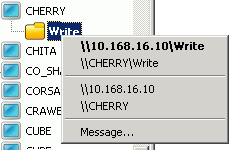 |
| IsOpeningEmptyComputer | Open a computer with no shared resources by double-clicking it (0-no, 1-yes). |
| ImageWidth** | Icon width. |
| ImageHeight** | Icon height. |
| [Network] – network parameters. | |
| SMBSharesMode* | SMB shares retrieval mode (0-do not retrieve, 1-standard, 2-shared folders only, 3-network printers only). |
| FTPSharesMode* | FTP shares retrieval mode (0-do not retrieve, 1-standard). |
| HTTPSharesMode* | HTTP shares retrieval mode (0-do not retrieve, 1-standard). |
| HTTPPorts* | HTTP ports (comma-separated). |
| ScanTimeout* | Scan timeout (in milliseconds). |
| SleepOfScan* | Delay during scanning (in milliseconds). |
| SleepAfterAdding* | Delay after adding a computer to the list (in milliseconds). |
| SleepOfWaiting* | Delay while waiting for the number of threads to decrease after reaching the maximum limit (in milliseconds). |
| IsGetSMBSharesByName* | Retrieve SMB shares by name (0-no {by IP address}, 1-yes). |
| IsGetSMBSharesIfNameEquIp* | Retrieve SMB shares if the name matches the IP address (0-no, 1-yes). |
| IsAddComputersIfNameEquIp* | Add computers to the list if the name matches the IP address (0-no, 1-yes). |
| IsScanOnStart | Start scanning immediately after NetLook starts (0-no, 1-yes). |
| NumberOfSockets* | Number of sockets used for scanning at the same time. |
| MaxNumberOfThreads* | Maximum number of threads. |
| [Messenger] – network message handler parameters. | |
| IsEnabled** | Network message handling enabled (0-no, 1-yes). |
| IsHistory | Save messages to history files (0-no, 1-yes). |
| IsPlayingMessageSound | Play a sound when a message is received (0-no, 1-yes). |
| IsReceivingRepeatingMessages | Receive repeating messages (0-no, 1-yes). |
| MessageDateTimeMode | Message date and time display mode (0-do not display, 1-display time only, 2-display date only, 3-display time first, then date, 4-display date first, then time). |
| MessageTimeFormat | Message time display format string. Format components: h – hour without leading zero in 12-hour format; hh – hour with leading zero in 12-hour format; H – hour without leading zero in 24-hour format; HH – hour with leading zero in 24-hour format; m – minutes without leading zero; mm – minutes with leading zero; s – seconds without leading zero; ss – seconds with leading zero; Example: HH:mm:ss |
| MessageDateFormat | Message date display format string. Format components: d – day of month without leading zero; dd – day of month with leading zero; ddd – abbreviated weekday name; dddd – full weekday name; M – month number without leading zero; MM – month number with leading zero; MMM – abbreviated month name; MMMM – full month name; y – last two digits of year without leading zero; yy – last two digits of year with leading zero; yyyy – year. Example: dd.MM.yy |
| MessageSound | Audio file to be played when a message is received. |
| MessageTemplate | Title template of the standard message service window. If the window title matches one of the template phrases, the standard window will be closed and the message text will be added to the NetLook messages window. This eliminates the need to disable the standard message service. If the standard service is disabled, NetLook will process messages by itself. Template phrases are separated by the "|" character. |
| [Paths] – paths to external applications. | |
| SMBOpeningApplication | Application used to open SMB shares. |
| FTPOpeningApplication | Application used to open FTP shares. |
| HTTPOpeningApplication | Application used to open HTTP shares. |
| TextEditor | Text editor used in NetLook. |
| [Window] – window parameters. | |
| X | Horizontal position. |
| Y | Vertical position. |
| Width | Width. |
| Height | Height. |
** Changes to these parameters take effect after restarting NetLook (menu item:
* Changes to these parameters take effect after refreshing the scan (menu item:


Language: English | Русский | Українська